ブログのXのアカウントを変更した。だから、ブログのリンク先も変更しようとしたのだけど、メールアドレスが知らないのが設定されていたのだ。
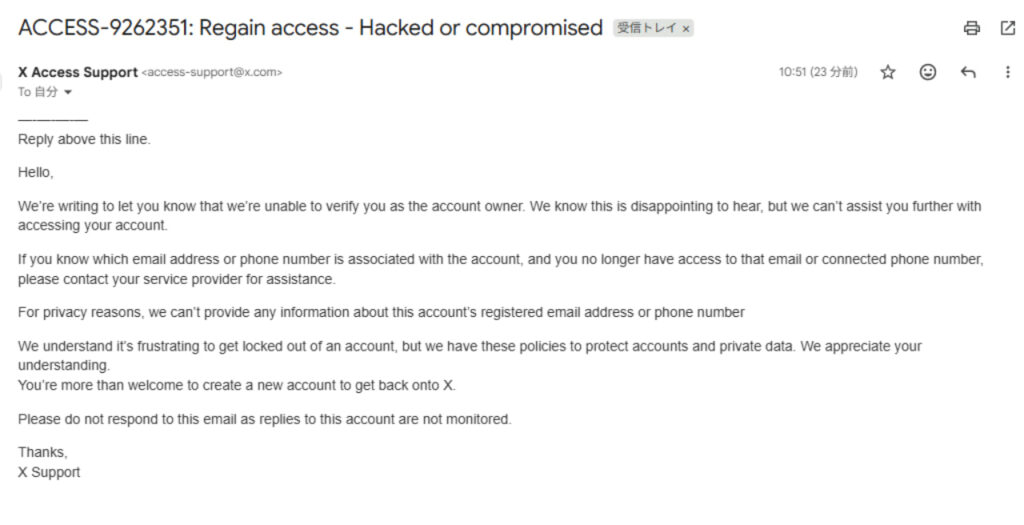
そこで、X(Twitter)に問い合わせてみると、下記のような内容が送られてきた。
Reply above this line.
Hello,
We’re writing to let you know that we’re unable to verify you as the account owner. We know this is disappointing to hear, but we can’t assist you further with accessing your account.
If you know which email address or phone number is associated with the account, and you no longer have access to that email or connected phone number, please contact your service provider for assistance.
For privacy reasons, we can’t provide any information about this account’s registered email address or phone number
We understand it’s frustrating to get locked out of an account, but we have these policies to protect accounts and private data. We appreciate your understanding.
You’re more than welcome to create a new account to get back onto X.Please do not respond to this email as replies to this account are not monitored.
Thanks,
X Support
要するに、お客様がアカウント所有者であることを確認できないという内容。
これはますます、外国の組織に乗っ取られたのではないかと焦った。(乗っ取られてもなにもコンテンツはないのだが)
問い合わせても解決できなかったため、ChatGPTに聞いてみることにしたのだが、すぐに解決した。
知らないメールアドレスが登録されてたから、乗っ取られたのか!?ってびびった。問い合わせても解決しなかたから、chatgptに聞いてみたらApple公式の安全機能が自動的に作るものらしい。
— TATOOL (@tatool38) November 14, 2025
解決したので、すぐにネタとしてXにポスト。(Twitterでなくなったためツイートではなく、今はポストというらしい)
ChatGPTが申すには、
それは Apple の「メールの非公開(Hide My Email)」機能 が作ったメールアドレスです。あなたが意識して設定していなくても、Apple IDやiCloudでアプリやウェブサイトにサインアップするときに自動で生成されることがあります。Apple公式の安全機能が自動的に作るもの で、
・勝手に誰かがログインした
・知らない人が設定した
ということでは基本的にありえない。
とのこと。
ということなので、メールアドレスを変更してみるとあっさりできて、電話番号も登録。
パスワードを登録する順番
パスワードを登録→「パスワードをお忘れですか?」→Xアカウントを探す→ユーザー名を入力→確認コードの送信先を選択してください(メールアドレスor電話番号)→パスワード変更
これでできる。